Construction Tools Icons Pack for Modern Design
Every designer knows the moment. You are building a landing page for a contractor, laying out a hardware store app, or designing an infographic about home renovation. You need a hammer icon. Then a saw. Then a hard hat, a wrench, a tape measure. You search across scattered sources, stitch together mismatched styles, and lose hours trying to make everything look cohesive. A Construction Tools Icons Pack solves this before the frustration even starts. It delivers a unified set of high-quality icons built specifically for projects that demand clarity, strength, and visual consistency.
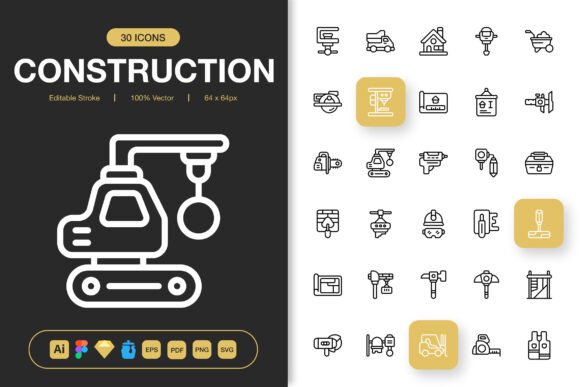
This is not a random assortment of clip art. The set includes carefully designed minimalist icons that work across websites, mobile apps, books, social media, infographics, flyers, print materials, banners, posters, and more. What makes them especially valuable is the foundation they are built on: editable strokes, 100% customizable layers, and a drag-and-drop workflow that respects your time. When you open the source files in Adobe Illustrator, Figma, Sketch, or Iconjar, you are not locked into someone else's creative decisions. You can change stroke weights, adjust colors, scale without quality loss, and match the icons exactly to your brand or project aesthetic.
What Makes a Useful Construction Icon Set
Icons are small pieces of communication. A good construction icon does not just look like a tool; it tells the user what action to take or what category to explore without words. The best sets achieve this through geometric clarity and familiar silhouettes. A hammer should read instantly at 32 pixels or 512 pixels. The grip, the head shape, the angle, all matter. A poorly drawn circular saw icon confuses people. A precise one directs them effortlessly.
This pack covers the full spectrum of building and trade imagery. You will find everything from basic hand tools like screwdrivers, pliers, and wrenches to heavier equipment like jackhammers, cement mixers, and cranes. Safety gear icons—helmets, goggles, gloves, ear protection—round out the selection for projects that need to communicate workplace safety or PPE compliance. Architectural tools like blueprints, compasses, rulers, and T-squares add precision for design-focused contexts.
Consistency Across Platforms and Resolutions
One overlooked advantage of a comprehensive icon pack is output flexibility. This product comes with PNG transparency files at seven resolution steps: 32px, 48px, 64px, 96px, 128px, 256px, and 512px. That range alone eliminates guesswork. A 32px version works for compact UI elements or footer icons. The 512px version handles hero graphics or large print layouts. SVG and PDF formats preserve vector scalability for designers who need to resize without limits. The EPS version 10 file ensures broad compatibility with older and newer vector editing software alike.
Bringing the Icons into Real Projects
Talk about versatility is abundant in product descriptions. Practical examples matter more. Here is how different creative professionals use a Construction Tools Icons Pack in daily work.
Web and App Designers often need to represent service categories. A home renovation platform might use the hammer and paint roller icons to separate building services from finishing services. A contractor booking app might assign the calendar icon alongside the tool icon to indicate scheduling availability. Since every icon uses an editable stroke, the designer can adjust the line thickness to match the company's typography weight. That level of harmony between text and iconography makes interfaces feel polished rather than assembled from mismatched parts.
Marketing Teams and Social Media Managers work with quick turnarounds. An Instagram story announcing a new construction season needs a strong visual in under an hour. Dragging a pre-made wrench or hard hat icon into a Figma frame, recoloring it to match the campaign palette, and pairing it with bold text saves valuable production time. The icons work the same way in flyers and posters for local trade shows, open houses, or hardware store promotions. When the same icon style appears across social, print, and store signage, brand recognition grows without extra effort.
Educators and Technical Writers create instructional materials, safety manuals, and training booklets. Clear tool identification matters when showing someone how to operate equipment correctly. A clean, recognizable icon next to each step reduces reading burden and supports users who process information visually. The PDF and SVG files slide directly into Illustrator for textbook layouts or into InDesign for booklet assembly.
Small Business Owners and Entrepreneurs in contracting, landscaping, carpentry, or handyman services often handle their own marketing. They need a website that looks professional but cannot hire a design team. Pre-built icon sets let them add visual polish to service lists, quote forms, and business cards without learning complex illustration skills. The drag-and-drop simplicity means they open a file, copy the icon they need, and paste it into their document or website builder.
Adapting Icons for Your Brand Identity
Minimalist icon design gives you a neutral starting point. That neutrality is powerful. A black outline icon fits a modern architectural firm. A filled orange version suits a heavy equipment rental company. A thin, light gray stroke aligns with a luxury home builder's subdued branding. Because the source files are fully editable, you can reverse engineer the style decisions that fit your audience.
Consider color psychology in construction. Safety yellow and caution orange communicate urgency and visibility—ideal for PPE or hazard-related icons. Deep blues and charcoals suggest stability and trust, which work well for general contracting and project management interfaces. The flexibility in this pack means you can maintain a master set and produce color variations for different clients or campaigns without redrawing anything.
Organizing Your Icon Workflow
Having a large set of icons is helpful only if you can find the right one quickly. The included Iconjar file makes this seamless. Iconjar acts as a visual browser where you can preview every icon, search by name, and drag directly into Sketch, Figma, or Photoshop. If your workflow lives in Adobe Illustrator, the AI source file keeps everything organized on clearly labeled artboards. The Readme file provides setup guidance so you spend zero time troubleshooting compatibility.
For teams sharing resources, consistent file naming and folder structure become essential. A recommended approach is sorting icons by function: hand tools, power tools, heavy machinery, safety, architectural. This mirrors how most construction industries categorize equipment and makes the set intuitive to navigate.
Using Icons in Infographics and Data Visualization
Infographics thrive on visual shorthand. A construction timeline infographic benefits enormously from tool icons marking each phase. A demolition icon represents the teardown stage. A framing hammer stands for structural work. Paint rollers and brushes signal finishing stages. This approach scans faster than text-heavy labels and adds a layer of professional polish to reports, presentations, and blog content.
For data visualization in annual reports or industry publications, icons act as legend markers or category indicators without cluttering charts. The minimalist style keeps the focus on the numbers while the icons quietly reinforce meaning.
Print Production and File Format Considerations
Print design demands resolution flexibility. A 32px PNG will pixelate on a poster. A 512px PNG might be overkill for a business card. The seven included PNG sizes give immediate options, while the EPS and SVG formats provide infinite scalability for large-format printing. Whether you are producing a tradeshow banner at ten feet wide or a pocket-sized price guide, the icons hold crisp edges.
PDF format adds another layer of convenience. Many print shops and publishing platforms accept PDF vectors natively. You can drop a PDF icon directly into an InDesign layout and maintain full vector quality throughout the production chain.
Staying Original While Using Pre-Made Icons
A common concern among designers is that stock resources will make their work look generic. The antidote is customization. These icons are starting points, not finished statements. Alter the stroke cap from rounded to flat and the entire personality shifts. Add a subtle drop shadow for a dimensional UI feel. Combine two icons—overlap a dollar sign on a wrench to represent affordable repairs—and suddenly the asset is uniquely yours. The editable source files make these transformations straightforward.
Originality also comes from context. The same hammer icon placed in a minimalist white-on-white website feels architectural and refined. The same icon in a bright, playful color palette on a kids' workshop app feels friendly and approachable. The icon adapts to the world you build around it.
Who Benefits Most from This Pack
Designers who juggle multiple client projects benefit from the time savings of a ready-to-use, organized library. Content creators benefit from having professional-grade visuals without commissioning custom illustrations. Educators gain clarity and visual consistency in instructional materials. Small businesses gain affordable access to assets that elevate their brand presence. Hobbyists and DIY bloggers add polish to project tutorials and printable plans.
The thread connecting all these users is a need for reliable, high-quality construction imagery that does not look cheap, inconsistent, or outdated. A well-built Construction Tools Icons Pack meets that need quietly and effectively. It stays out of the way when you are deep in a workflow and delivers exactly the asset you need in seconds.
Long-Term Value of a Consistent Icon Library
Investing in a comprehensive icon set shapes future projects. Once you have the files organized and familiar, new assignments move faster. A returning client requests a safety training module, and you already have the helmet, goggles, and glove icons ready. A seasonal marketing push requires tool-themed email graphics, and the PNGs are sized and waiting. The upfront organization pays dividends in reduced production time and increased visual uniformity across everything you create.
For agencies and freelancers, presenting work that feels cohesive from icon to layout signals attention to detail that clients notice. That attention builds trust and often leads to repeat business. Small details like properly scaled, style-consistent icons separate professional work from rushed assembly.
Getting Started Without Friction
The pack includes source files for Adobe Illustrator, Figma, Sketch, and Iconjar, plus EPS, PDF, SVG, and multiple PNG sizes. Whatever design environment you prefer, compatibility is covered. The Readme.txt file walks through file locations and usage tips so you start producing in minutes, not hours. Whether you are designing a contractor website, laying out a hardware catalog, or crafting a renovation infographic, the icon set slides into your pipeline smoothly.
Minimalist design, practical range, editable architecture, and instant export versatility make this Construction Tools Icons Pack a pragmatic choice for anyone serious about clear visual communication. From the first drag-and-drop to the final export, it supports efficient, professional work that holds up across every medium you can imagine.