Children Toys Icons Pack: Minimalist Designs for Every Project
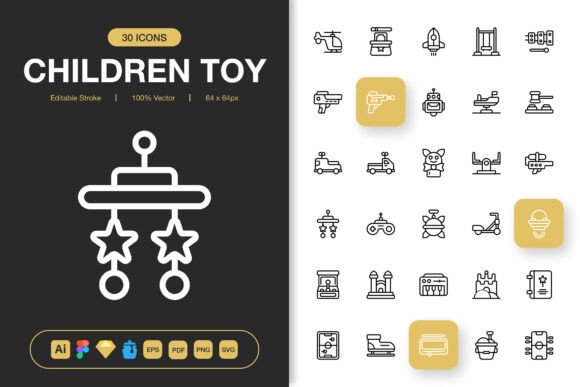
When you picture a children’s toy icon, a cluttered or overly cutesy graphic might come to mind. But the Children Toys Icons Pack takes a different route. It delivers a clean, minimalist collection of vector‑based toy icons that slot effortlessly into websites, apps, print materials, and branding. Instead of generic shapes, you get carefully crafted outlines – dolls, building blocks, kites, rocking horses, teddy bears, and more – all with a consistent, modern line style. The pack includes source files for Adobe Illustrator, Figma, Sketch, and Iconjar, alongside EPS, PDF, SVG, and a generous stack of transparent PNGs in sizes from 32px all the way to 512px. That combination of formats and sizes transforms a simple set of graphics into a practical toolkit for anyone who needs child‑friendly visuals that don’t look outdated or hasty.
What Makes This Icon Set Different from Free Downloads
The web is full of toy clipart, but quality and flexibility vary wildly. The Children Toys Icons Pack is built around a few deliberate choices that solve real workflow problems. First, every icon supports editable strokes. You can change the stroke weight, round caps, and corner style without breaking the design. In vector editors, a single click lets you switch a thin, delicate outline into a bold, playful border – something free alternatives rarely allow. Second, the icons are 100% customizable. Keep the minimalist line art, or fill shapes, adjust colors, or combine elements to create unique compositions. Third, the pack is delivered in a drag‑and‑drop ready structure, so even if you never touch a vector program, the PNG files are at your disposal immediately.
Choosing the Right Format for Your Creative Workflow
Different projects demand different file types, and the pack’s broad coverage respects that reality. If you’re a beginner building a blog or a social media post, the PNG transparency sizes (32px, 48px, 64px, 96px, 128px, 256px, 512px) let you grab and go. For experienced UI designers, the Figma file and Sketch file become a design system asset – reusable, pixel‑perfect, and easy to scale inside prototyping tools. The Adobe Illustrator source file and EPS Version 10 keep print professionals happy, while the SVG file guarantees smooth integration across web development stacks. And if you like organizing icon libraries, the Iconjar file lets you drag icons directly into your favorite design software.
When Quick PNGs Are Enough – and When You’ll Want Vector Source Files
A hobbyist putting together a birthday invitation in Canva may never open the AI file – and that’s perfectly fine. The ready‑made PNGs at multiple resolutions mean no resizing guesswork. On the other hand, a children’s book illustrator who needs to recolor a kite icon to match a specific palette will appreciate the editable stroke and shape‑level control inside Illustrator or Figma. The pack doesn’t force one way of working; it simply gives you the building blocks and steps back.
Practical Ways Different Creatives Rely on Toy Icons
The value of an icon set becomes clear only when you see it in action. Here’s how real projects put this children toys icons pack to work – often in ways that have little to do with traditional “toy store” contexts.
- A web designer crafting a kids’ learning platform uses the SVG files to build a clean navigation system. The teddy bear icon marks the “storytime” section, and a building block icon leads to puzzle games. Because the stroke weight can be adjusted, the icons remain legible at both mobile and desktop breakpoints.
- An app developer building a parent‑child activity tracker pulls the Figma file into the design library. A kite represents outdoor play, a doll indicates imaginative play – each icon is lightweight enough that the app’s performance doesn’t suffer.
- A social media marketer promoting a daycare center uses the 512px PNGs in Instagram stories and flyers. The minimalist style stays on‑trend and avoids looking like outdated clip art, which matters when you want to position a caring service as modern and trustworthy.
- A children’s book author self‑publishing a rhyming title places small toy icons next to recurring characters, creating a visual legend. The PDF file slots into the layout without pixelation, and the editable stroke lets the author match the icon thickness to the book’s hand‑lettered feel.
- An educator preparing printable worksheets relies on the transparent PNGs. A row of blocks becomes a counting exercise, and a spinning top illustrates a phonics sound. The high‑quality output means the worksheets look crisp even on a budget printer.
- A small business owner running a neighborhood toy shop uses the icons on a flyer and a weekend poster. The EPS file goes directly to the local print shop, while the same icon in PNG form tops an email newsletter. No re‑design, no extra cost.
Customization Without the Headache
Some icon packs promise customization but deliver a frustrating experience – outlines that refuse to scale, mysterious unwanted fills, or shapes that aren’t truly ready for recoloring. Here, the promise of editable stroke is genuine. In Illustrator, you can expand or contract the stroke, convert it to outlines if needed, and even apply custom brush styles while preserving the core shape. The Figma and Sketch files respect nested components, so you can change the stroke color globally across all instances or tweak individual icons without altering the source. For those who just need a quick tweak, the easy drag‑and‑drop setup means you can insert a PNG into PowerPoint, Keynote, or a simple photo editor, and still achieve a professional result.
Understanding the File Package and What You Get
Clarity about file contents helps avoid the “but I thought it came with…” moment. The Children Toys Icons Pack is explicitly distributed with:
- Source File Adobe Illustrator (.ai) – fully layered and editable
- Figma File (.fig) – ready to duplicate and integrate into your design system
- Iconjar File (.iconjar) – for organized icon management and drag‑and‑drop workflows
- Sketch File (.sketch) – compatible with the popular macOS design tool
- EPS Version 10 (.eps) – a widely supported vector format for print and legacy software
- PDF File (.pdf) – easy to preview and import into documents
- SVG File (.svg) – ideal for web and responsive design
- PNG Transparency – in 32px, 48px, 64px, 96px, 128px, 256px, and 512px sizes, with a transparent background
- Readme.txt – a quick overview and license information
That broad coverage means you won’t scramble to convert a file at the last minute, and you won’t need a separate program just to open a format your printer requested.
Who Benefits Most from a Toy Icon Collection?
Because the pack revolves around a children’s theme, it’s easy to assume the only audience is children’s brands. The reality is wider. Parents who design personal photo albums or scrapbooks find the icons a charming addition. Freelance graphic designers keep the pack in their back pocket for any client who works with family services, pediatric clinics, toy manufacturers, or kids’ events. Bloggers covering parenting or education topics use the icons to break up text and add a playful touch without overwhelming the page. Even a corporate trainer building a workshop about creativity might use a block icon as a metaphor – the minimalist style fits a professional slide deck while staying friendly.
Beginners and the Appeal of Ready‑to‑Use Visuals
If you’ve never opened Adobe Illustrator, the sheer number of formats might seem intimidating – but it doesn’t have to be. The PNG folder is intentionally simple. You grab the size you need, drop it onto your canvas, and you’re done. The transparent background means no white boxes around your icon. For a parent making a birthday banner in Google Docs, this is a stress‑free experience. The ease of use here is immediate, and the quality is already higher than a compressed JPEG from a random image search.
Experienced Designers and the Value of Source Files
Professionals know that a flat PNG can become a dead end. The moment a client says “Make that line thinner and change all the icons to our brand blue,” source files save the day. The Figma and Sketch files let a designer adjust the stroke and export new assets in seconds. The AI file allows for style variations – perhaps an outlined version for web and a solid, pastel‑filled version for print. This level of control means the icon set can be reused across multiple clients without looking repetitive. The flexibility and long‑term usefulness far outweigh a one‑and‑done PNG download.
Educators, Marketers, and the Need for Non‑Generic Visuals
For an educator, clip art often comes with educational worksheets, but those assets are usually too cartoony or low resolution. The minimalist toy icons in this pack offer an age‑neutral style: young children recognize the objects, while older students don’t feel patronized. A high school psychology teacher might use the teddy bear icon in a presentation about attachment theory without a trace of childishness. Similarly, a marketer for a maternity boutique can place the icons in an email campaign – the line style matches modern typography, keeping the message elegant.
How to Identify If This Icon Pack Matches Your Goals
Not every project needs a dedicated children’s toy icon set. Ask yourself a few practical questions before deciding:
- Is your audience primarily families, kids, or caregivers? If the answer is yes, the thematic fit is obvious. Even subtle touches – a small toy icon in a corner – can reinforce belonging and warmth.
- Do you need an aesthetic that feels current and airy? The minimalist line style adapts to clean interfaces and uncluttered print layouts. If your brand leans playful but not juvenile, the balance works well.
- Are you comfortable with vector files, or do you prefer to stick with pre‑sized PNGs? The pack supports both paths. You won’t be forced into a vector editor, but you’re not locked out if you decide to learn one later.
- Do you value being able to tweak stroke thickness and color easily? The editable stroke feature is a game‑changer for anyone who needs consistency across multiple platforms. If you’ve ever had to re‑create an icon just to match a 2px stroke guideline, you’ll appreciate the time saved.
- Will you use the icons across diverse media – web, app, print, social – over time? The range of included formats (AI, Figma, Sketch, EPS, PDF, SVG, and multiple PNG sizes) directly answers multi‑channel needs, reducing the need to purchase separate assets.
At its core, the Children Toys Icons Pack avoids forcing you into a single workflow. Beginners get a friendly entry point with transparent PNGs. Advanced users gain complete control through source files and editable strokes. Educators, marketers, publishers, and small business owners each find a straightforward path to using high‑quality, cohesive icons that brighten a project without overselling a theme. By offering a structured yet flexible collection, the pack bridges the gap between “just decoration” and a genuinely useful design resource.